On the Unhideable Excel Upsell Button
So... not sure what got into me, but I decided I wanted Excel, of all things.
The supposed reason is that I'd like to keep track of some machine learning experiments; they're somewhat around the level of "hello world", but it's a fun thing to play with. Same thing with personal finances. Supposedly, half of Wall Street is running on Excel; wouldn't you be at least a bit curious about what's so cool about this tool? ("But you already know how to program, spreadsheets are just for people who can't" sounds a bit like the reasoning that leads to "you'll only ever need a command line", about which... I have some opinions. Also, how do you know if you haven't even tried.)
So! I open Excel as a happy new Office 365 subscriber (... I don't quite remember installing Office earlier, but... it's... there somehow); it works great after a login. There are genuinely cool features in there!
And then, a couple hours later... I reopen it... only to see this:
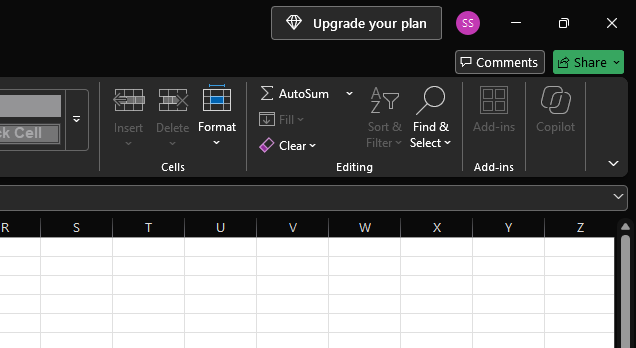
... what?
"Upgrade your plan", it says. Clearly more prominently than most other things you could be doing with it.
I just paid for this. I'm an entirely truly legimitate user of this thing, and yet, I get this uncanny feeling of... can I, please, for just a moment, enjoy the feeling of having a shiny new thing, instead of staring at an ad trying to get you to buy something that you almost surely don't need?
As in... what are they even selling? They have a Family plan (... for more users) and a Premium plan, with higher limits; none of this applies to a brand new user who had zero usage so far & is clearly the first (and currently only) person on the account to start using it.
(Imagine, for a moment, a meeting, in a conference room somewhere in Redmond, WA; glass walls, a view of a farm of cubicles, with some hills with pine trees visible through a far away window.
"We think adding an additional upsell surface for plan upgrades would increase uptake by 17 percent", one of them points at the PowerPoint slide. "Office 365 Product Growth Strategy Sync", says the Outlook calendar item. "... well, there is some space for an extra button on Windows, right?" He looks around. All of them have Macs. Shrug. "Yeah, let's put it onto the agenda so that John can sign off on it by Q3.")
Well okay, let's try to look it up how to hide this.
... there doesn't seem to be a way to hide this. People on Reddit are trying various things, including downgrading Office altogether, to versions before this; there is complaints about this hiding the actually legitimate quick launch bar, various hacks that don't work anymore, ... what's going on here?
Since it showed up on a later launch, almost like a... notification: it was already pretty suspicious that it's something sent out from the server side. Which... likely lands in the registry. Somewhere.
Well, fortunately, this is 2026; what used to be a medium-large project to dig this up, now turns into a fun romp with Claude trying to figure out how this actually works.
As it turns out... the registry does store this somewhere; in a format that's, well, somewhat ugly but actually readable!
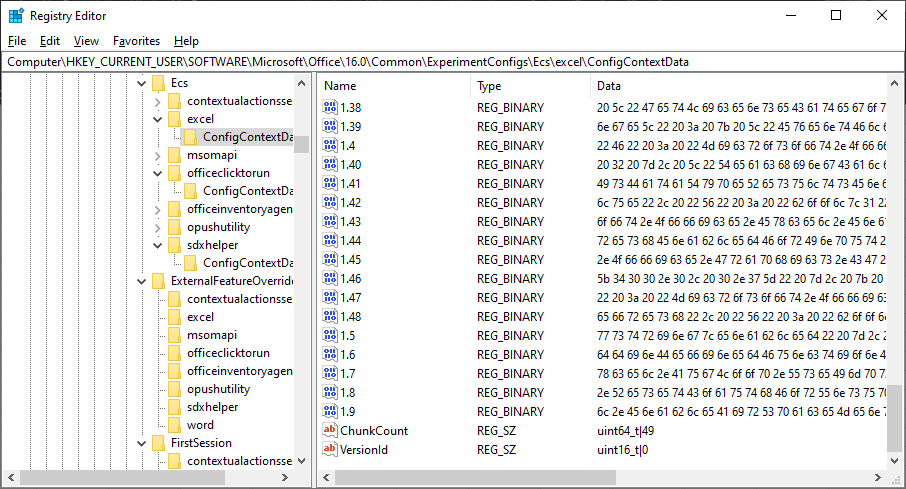
This, in fact, an odd, chunked JSON.
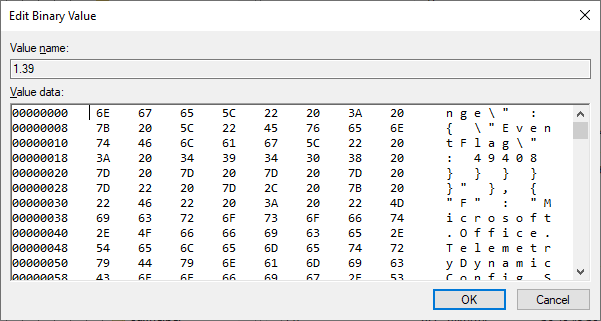
Whoever wrote this surely have their reasons to not store keys & values as, um, keys and values within another layer of keys and values, at least a more charitable one than "Microsoft prefers some obfuscation over this"... maybe it's the amount of syscalls for 1700 server-side flags? well, here is what the JSON looks like:
{
  "Ver"     : "int32_t|0",
  "CC"      : "std::wstring|US",
  "ExpTime" : "int64_t|1789895611",
  "ConfIds" : "std::wstring|P-R-1755680-1-1,P-R-1098158-1-5, ... (hundreds more)",

  "FCMap" : [
    ... among 1700ish other flags...
    { "F" : "Microsoft.Office.Licensing.AllowOneNoteERFM", "V" : "bool|0" },
    { "F" : "Microsoft.Office.Licensing.AllowPipcUpsellExtensionBizBar", "V" : "bool|1" },
    { "F" : "Microsoft.Office.Licensing.DelayForGenuineOfficeDialog", "V" : "int64_t|2" },
    { "F" : "Microsoft.Office.Licensing.DimeWebViewDialog.Height", "V" : "int64_t|692" },
    { "F" : "Microsoft.Office.Licensing.EnableNoEntitlementsMobilePlan", "V" : "bool|1" },
    { "F" : "Microsoft.Office.Licensing.EnableWebview2ForSetupOffice", "V" : "bool|1" },
    { "F" : "Microsoft.Office.Licensing.ErfmEligibleMarkets", "V" : "std::wstring|" },
    { "F" : "Microsoft.Office.Licensing.ErfmLaunchUpsellDirectlyFromPaintedDoor", "V" : "bool|1" },
    { "F" : "Microsoft.Office.Licensing.ErfmOneDriveFREEnabled", "V" : "bool|1" },
    { "F" : "Microsoft.Office.Licensing.ErfmRightTimeSignInEnabled", "V" : "bool|0" },
    { "F" : "Microsoft.Office.Licensing.FA000000069.GraceLicenseExpiredRecentlyVariant", "V" : "int64_t|1" },
    { "F" : "Microsoft.Office.Licensing.GetGenuineOfficeCampaignTreatment", "V" : "int64_t|7" },
    { "F" : "Microsoft.Office.Licensing.GetPersistentUpgradeTreatment", "V" : "int64_t|3" },
    { "F" : "Microsoft.Office.Licensing.LaunchExtentionComponentDialogEnabled", "V" : "bool|1" },
    { "F" : "Microsoft.Office.Licensing.ShowBusbarsAfterLVUX", "V" : "bool|0" },
    { "F" : "Microsoft.Office.Licensing.ShowFixLicensingInBackstage", "V" : "bool|1" },
    { "F" : "Microsoft.Office.Licensing.ShowPerpetualUpgrade", "V" : "bool|1" },
    { "F" : "Microsoft.Office.Licensing.ShowPipcFallbackDialog", "V" : "bool|1" },
    { "F" : "Microsoft.Office.Licensing.ShowUpdateLicenseOutSpaceButton", "V" : "bool|0" },
    { "F" : "Microsoft.Office.Licensing.SplitPartnerIdByApp", "V" : "bool|1" },
    { "F" : "Microsoft.Office.Licensing.UseCanRunFeatureCacheFlat", "V" : "bool|1" },
    { "F" : "Microsoft.Office.Licensing.UseCanRunFeatureCacheUpdate", "V" : "bool|1" },
    { "F" : "Microsoft.Office.Licensing.UseRefactoredConfigDeprovision", "V" : "bool|0" },
    { "F" : "Microsoft.Office.Licensing.UseRefactoredCopilotFeatureLogic", "V" : "bool|0" },
    { "F" : "Microsoft.Office.Licensing.UseScaRedesign", "V" : "bool|1" },
    { "F" : "Microsoft.Office.Licensing.UseSessionIdForPython", "V" : "bool|1" },
  ]
}
This is the experiment config that's coming from the server. This is the likely way they're doing A/B testing. E.g. they can decide to enable this button for 10% of the users, see how many of them click on it / buy the upgrade.
Of note is AllowPipcUpsellExtensionBizBar. Turns out... if you set this to 0... the button is gone!!!
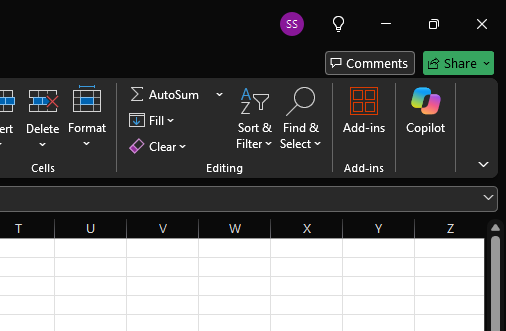
(
If you're curious, here is some code to do this. (... while Excel is not running; it only reads it once & it might rewrite it on exit.)
$b = "HKCU:\Software\Microsoft\Office\16.0\Common\ExperimentConfigs"
foreach ($p in "Ecs","FirstSession") {
  $k = "$b\$p\excel\ConfigContextData"; if (!(Test-Path $k)) { continue }
  $r = Get-Item $k
  foreach ($n in $r.GetValueNames()) {
    $v = $r.GetValue($n); if ($v -isnot [byte[]]) { continue }
    $s = [Text.Encoding]::UTF8.GetString($v)
    $o = $s -replace '(AllowPipcUpsellExtensionBizBar", "V" : "bool\|)1', '${1}0'
    if ($o -ne $s) { Set-ItemProperty $k $n ([Text.Encoding]::UTF8.GetBytes($o)) -Type Binary }
  }
}
It's a bit messy since it needs to deal with JSON split across multiple values... it might also fail if this particular value is split between multiple chunks, but... it does show the actual concept: just set that 1 to 0 next to AllowPipcUpsellExtensionBizBar.
(and today I learned what the Biz Bar is.)
Of course... the next time Excel checks in with the Microsoft servers, it will re-download all of this; the button will be back. Well... as it turns out... if you nuke this entire cache and revoke permissions on the registry key to write anything to it, Excel will not complain: it is perfectly fine to start up without any server side flags for this (it's fetching them after startup), and it's also OK with just not writing them. So you can just do something like:
$b = "HKCU:\Software\Microsoft\Office\16.0\Common\ExperimentConfigs"
$deny = New-Object Security.AccessControl.RegistryAccessRule(
  "$env:USERDOMAIN\$env:USERNAME", "SetValue,CreateSubKey", "Deny")
foreach ($p in "Ecs","FirstSession") {
  $k = "$b\$p\excel\ConfigContextData"; if (!(Test-Path $k)) { continue }
  $r = Get-Item $k
  foreach ($n in $r.GetValueNames()) { Remove-ItemProperty $k -Name $n -Force }
  $a = Get-Acl $k; $a.AddAccessRule($deny); Set-Acl $k $a
}
... so that not even you (... including Excel) have the permission to update the experiment config (note the removal of SetValue etc).
By the way: this is somewhat tricky to undo, since now you don't actually have permission to edit the perimissions either... but you're still the owner, so you can fix it like this if you want to have the experiments update again:
foreach ($p in "Ecs","FirstSession") {
  $path = "Software\Microsoft\Office\16.0\Common\ExperimentConfigs\$p\excel\ConfigContextData"
  $key = [Microsoft.Win32.Registry]::CurrentUser.OpenSubKey($path,
    [Microsoft.Win32.RegistryKeyPermissionCheck]::ReadWriteSubTree,
    [Security.AccessControl.RegistryRights]::ChangePermissions)
  $acl = $key.GetAccessControl()
  $acl.Access | ? { $_.AccessControlType -eq 'Deny' } | % { [void]$acl.RemoveAccessRule($_) }
  $key.SetAccessControl($acl); $key.Close()
}
(For the record, the "permissions" trick will prevent you from being the subject to any server-side experiments, which might have some odd side effects. On the other hand, it'd be really silly if actual licensing was this easy to circumvent, so by doing this, you don't risk accidentally using The Product after your license expires. So: use at your own risk; we take no responsibility for this code from deleting all your files, introducing dangerous bacteria to the rivers of Southeast Pittsburgh, or, worse yet, you being allowed to use The Product after your license expires.)